From prompt to print.Your Prusa printers, in your AI chat
Prusa MCP lets Claude, ChatGPT and other AI assistants find a model on Printables, slice it, print it and check on it, all in one conversation. Official and free.
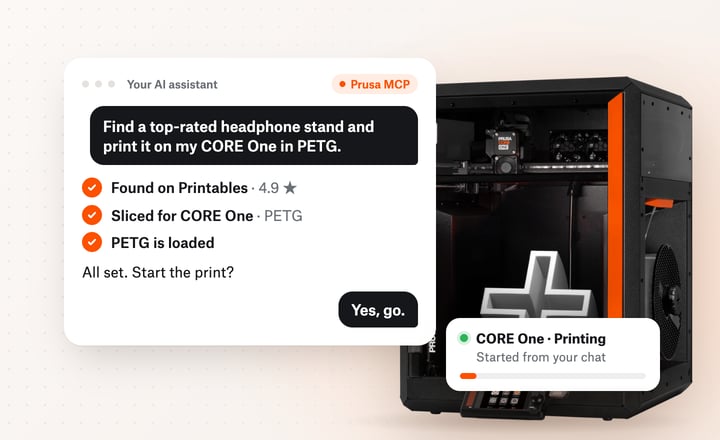
One conversation, start to finish
No slicer to open, no file to copy, no app to switch to. This is what it looks like.
Your assistant searches the Printables library and suggests models by rating and downloads.
It slices the model in EasyPrint, Prusa's cloud slicer, with the profile for your printer. If the slicer warns the part could tip over, it adds a brim or supports and slices again.
It checks which filament is loaded in your printer and, if you track your spools in Prusa Connect, how much is left.
It uploads the file to Prusa Connect and starts the print. Keep your assistant set to ask before it acts, so nothing starts without your OK.
Progress and time left for every printer in your account, without opening Prusa Connect.
There's more you can ask
One connection to the Prusa services you already use.
Run your printers
Pause, resume or cancel a job, reorder the queue, or print a file that's already on the printer's USB drive.
Fix problems
Answers from official Prusa manuals and Help articles, with a link to the source, in your language.
Find parts that fit
Spare parts and upgrades for the exact printers in your account, with current prices and a link to buy.
Track your filament
Know whether a spool will last before a long print, and keep your spool inventory up to date.
Choose materials
Look up a filament's print settings, and find the closest colour when yours is out of stock.
Set up the MMU
Tell your printer which material sits in which MMU slot, and map a multi-colour print to the right spools.
Connect in a couple of minutes
Add Prusa MCP to your AI assistant, sign in with your Prusa account and start asking. Pick your assistant below. Menu names may differ slightly between app versions.
Add a custom connector
Available on paid Claude plans, on the web and in the desktop app.
1. Go to Settings → Connectors and choose Add custom connector.
2. Name it Prusa and paste the server URL:
https://mcp.prusa3d.com/mcp
3. Click Connect and approve access with your Prusa account. The Prusa tools then appear in Claude's tool menu.
Official, and acting only as you
Built and run by Prusa Research, the team behind Prusa Connect.
Official Prusa service
Runs on Prusa's own infrastructure, next to Prusa Connect. No third party sits between you and your printers.
Your account, your permissions
Every request runs as you. Your assistant can see and do only what you can in Prusa Connect, and Prusa MCP never sees your password.
You stay in control
Keep your assistant set to ask before anything that starts or changes a print, and check the printer is clear before it starts. Sign out at any time to cut off access.
A deliberate set of actions
Your assistant gets a selected set of actions, not the whole Prusa API. All traffic is encrypted.